
Home Page Screen
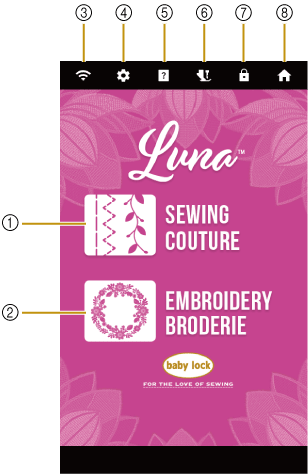
- Sewing key
Select a utility stitch or character/decorative stitch pattern.
- Embroidery key
Select an embroidery pattern. Attach the embroidery unit.
- Wireless LAN key
Shows the machine’s signal strength. Touch this key to specify the wireless settings. If there is a new update file, the key appears as
 .
. - Settings key
Customize the various machine settings.
- Machine help key
See explanations on how to use the machine. You can see the instructional videos by scanning the QR code displayed on the Help screen.
- Presser foot/Needle exchange key
Touch this key before changing the needle, the presser foot, etc. This key locks all key and button functions to prevent operation of the machine. Touch this key again to unlock all keys and buttons.
- Screen lock key
Lock the screen. When the screen is locked, you can still sew, but cannot change any of the screen functions. Touch this key again to unlock the screen.
- Home page screen key
Return to the home page screen at any time and select a different category - [Sewing] and [Embroidery].