
Automatic Thread Cutting
After selecting a stitch pattern, turn on the automatic thread cutting function before sewing, and the machine will automatically sew reinforcement stitches (or reverse stitches, depending on the stitch pattern) at the beginning and end of sewing, and trim the threads at the end of sewing. This function is useful when sewing buttonholes and bar tacks.
Select a stitch pattern.
Touch
 to set the automatic thread cutting function.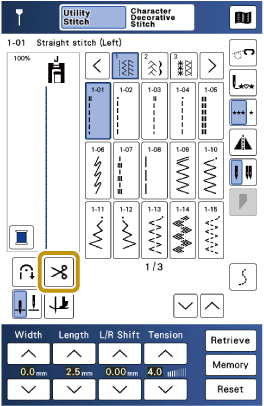
- The keys will display as

 , and the machine is set for automatic thread cutting function and automatic reverse/reinforcement stitching.
To turn off the automatic thread cutting function, touch
again, so it appears as .- The keys will display as
Set the needle into the fabric and start sewing.
- The machine will automatically sew reverse stitches (or reinforcement stitches) and then continue sewing.
Once you have reached the end of the stitching, press
 (Reverse stitch button) or
  (Reinforcement stitch button) once.
Some stitch patterns, such as buttonholes and bar tacking, include reinforcement stitches. It is not necessary to select the reverse stitch or reinforcement stitch buttons for these patterns.
- After the reverse stitching (or reinforcement stitching) has been done, the machine stops, and the threads are cut.
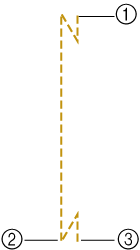
- The point where the “Start/Stop” button was pressed.
- The point where (Reverse stitch button) or (Reinforcement stitch button) was pressed.
- The thread is cut here.