
Making Adjustments
Your stitch pattern may sometimes turn out poorly, depending on the type or thickness of fabric, the stabilizer material used, sewing speed, etc. If your sewing does not turn out well, sew trial stitches using the same conditions as the real sewing, and adjust the stitch pattern as explained below. If the stitch pattern does not turn out well even after making adjustments based on the stitch pattern described below, make adjustments for each stitch pattern individually.
This adjustment can be made to 1-36 Quilting stippling stitch, 2-21 Decorative stippling stitch, 4-23 Eyelet stitch, 4-24 Star eyelet stitch, Q-15 Quilting stippling stitch and stitch patterns from the following categories.


Touch
 and select stitch (6-268).
Attach the monogramming foot “N” and sew the stitch pattern.
Be sure to use the monogramming foot “N”. Adjustments may not be made correctly with any other presser foot.
Compare the finished stitch pattern to the illustration of the correct stitch pattern below.

Touch
 , and then adjust the stitch pattern with the [Fine Adjust Verti.] or [Fine Adjust Horiz.] displays.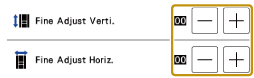
Problem
Solution
The stitch pattern is bunched.

Touch
 in the [Fine Adjust Verti.] display.
- The displayed value increases each time the button is touched and the stitch pattern will lengthen.
The stitch pattern has gaps.

Touch
 in the [Fine Adjust Verti.] display.
- The displayed value decreases each time the button is touched and the stitch pattern will shorten.
The stitch pattern is skewed to the left.

Touch
in the [Fine Adjust Horiz.] display.- The displayed value increases each time the button is touched and the stitch pattern will slide to the right.
The stitch pattern is skewed to the right.

Touch
in the [Fine Adjust Horiz.] display.- The displayed value decreases each time the button is touched and the stitch pattern will slide to the left.
Sew the stitch pattern again.
If the stitch pattern still comes out poorly, make adjustments again. Adjust until the stitch pattern comes out correctly.
You can sew with the setting screen on the display.
Touch [OK] to return to the original screen.