
Saving Embroidery Patterns
Do not turn the main power to OFF while the [Saving...] screen is displayed. You will lose the pattern you are saving.
Touch [Memory] when the pattern you want to save is in the embroidering screen.
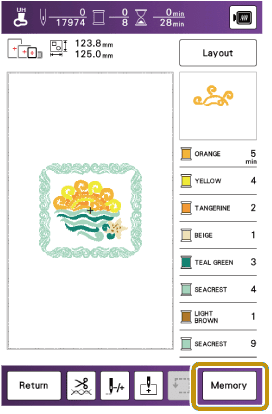
You can also save the pattern by touching [Memory] in the embroidery edit screen.
When saving the embroidery pattern in a USB media, insert the USB media into the USB port on the machine.
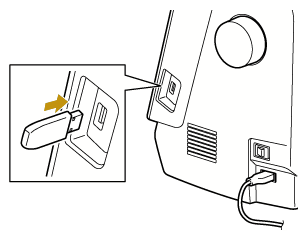
Touch the desired destination to start saving.
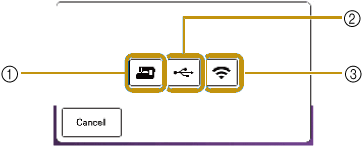
- Save to the machine’s memory.
- Save to the USB media. The pattern is saved in a folder labeled [bPocket].
- Save to the wireless function pocket. For the detailed procedure, refer to the manual for Palette (version 11 or later) or Design Database Transfer.
- Embroidery patterns which were saved to the wireless function pocket will be deleted from the pocket when turning the machine off or entering the Power saving mode. Import the embroidery patterns to Palette (version 11 or later) before turning the machine off or entering the Power saving mode.
- Do not turn off the machine while saving patterns. Turning off the power may corrupt the pattern data being saved or any pattern data that has already been saved.