
Adjusting the Embroidery Speed
Touch
 .
.- The settings screen appears.
Touch
 .
.- The embroidery settings screen appears.
Display [Max Embroidery Speed] in the embroidery settings screen.
Use

 to change the maximum embroidery speed.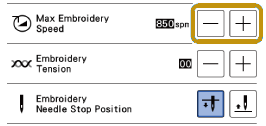
- SPM is the number of stitches embroidered in one minute.
- Decrease the embroidery speed when embroidering on thin, thick, or heavy fabrics and when using a specialty thread like a metallic thread.
- The setting specified before the main power is set to OFF remains selected the next time that the machine is turned ON.
Touch [OK].