
Curve Sewing Mode
The presser foot pressure changes with the needle movement, ensuring smooth fabric feeding and preventing puckering when turning the fabric.
When you change the settings of curve sewing mode or when you turn it off, the presser foot moves. While the presser foot is moving, lightly place your hands on the fabric to prevent the fabric from slipping or falling. Do not operate the machine or adjust the fabric until the presser foot is stopped. Otherwise, it may affect the sewing results.
Touch
 to turn on curve sewing mode.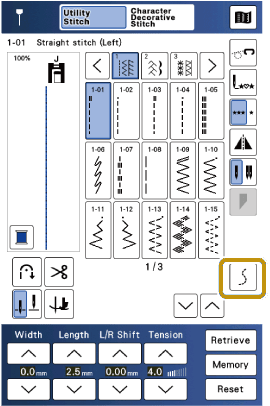
Select a stitch pattern. The following stitch patterns are recommended.


Use the presser foot suitable for the selected stitch pattern.
Place the fabric at the initial sewing position.
- Before starting your project, we recommend performing a trial sewing using the actual fabric and number of layers you will use.
- Make sure there are no obstacles such as pins on the fabric so the fabric can be detected correctly.
Touch [Auto Adjust].
- The presser foot pressure will be set to match the fabric.
While the presser foot is moving, keep your hands lightly on the fabric.
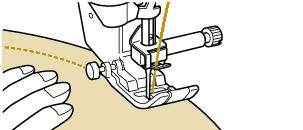
Start sewing. We recommend sewing at a medium or lower speed.
Make sure that the fabric is feeding properly and the curve is sewn well. If there are no problems, continue sewing.If adjustment is needed, select [Fine-tune] to change the presser foot pressure.
- If the fabric does not feed:
Touch [+] to increase the pressure. - If curves are difficult to sew:
Touch [-] to decrease the pressure.
- The presser foot will move. Lightly place your hands on the fabric.
Whenever you change the type or number of layers of fabric, touch [Auto Adjust] to reset the presser foot pressure.
- If the fabric does not feed: