
Selecting Multiple Patterns at the Same Time
Multiple patterns can easily be edited, for example, when moving patterns, if they are all selected together.
Touch
 .
.
Touch each pattern to be selected.
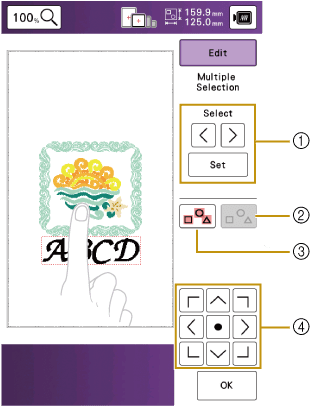
- Touch
 or
or  to check the patterns to be selected, and then touch
  . The selected patterns are highlighted with a red box. To deselect the selected patterns, touch
  .
. - Touch this key to deselect all selected patterns.
- Touch this key to select all patterns in the pattern display area.
- Patterns can be moved with these keys.
You can also select multiple patterns by dragging your finger to specify the area of selection.
- Touch
Touch [OK] to return to the edit screen.
- Each selected pattern is surrounded with a red box.
The following functions are available while multiple patterns are selected.
- Moving
- Copying
- Grouping