
Sewing Various Fabrics
Sewing Heavyweight Fabrics
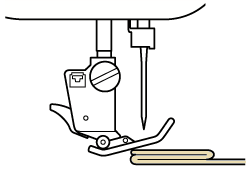
If the thickness of a seam causes the presser foot to rest at an angle, help guide the fabric by hand and sew on the downward slope.
 CAUTION
If fabric more than 6 mm (approx. 1/4 inch) thick is sewn or if the fabric is pushed with too much force, the needle may break and cause injury.
Thicker fabrics require a larger needle.
If the Fabric does not Fit under the Presser Foot
If the presser foot is in the up position, and you are sewing heavyweight or multiple layers of fabric which do not fit easily under the presser foot, further lift the presser foot lever to raise the presser foot to its highest position. The fabric will now fit under the presser foot.
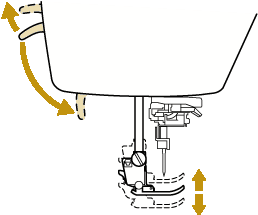
You cannot use the presser foot lever after the presser foot has been raised using  (Presser foot lifter button).
If the Fabric does not Feed
When sewing thick fabric such as denim or quilting layers, the fabric may not feed at the start of sewing if the presser foot is not level, as shown below. In this case, use the presser foot locking pin (black button on the left side) of zigzag foot “J” so that the presser foot remains level while sewing, allowing the fabric to be fed smoothly.
If the presser foot misalignment is too large, place thick paper or fabric (with the same thickness as the fabric being sewn) under the heel of the presser foot to be able to start sewing smoothly.
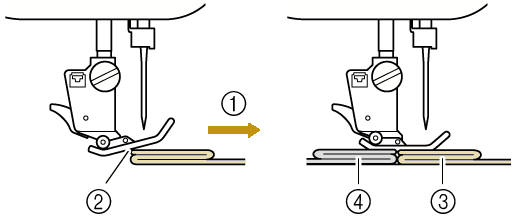
- Sewing direction
- Misalignment
- Fabric being sewn
- Fabric or thick paper
Raise the presser foot.
While keeping the black button on the left side of presser foot “J” pressed in, press
(Presser foot lifter button) to lower the presser foot.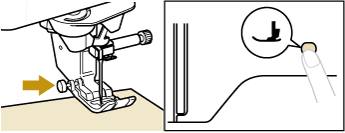
Release the presser foot locking pin.
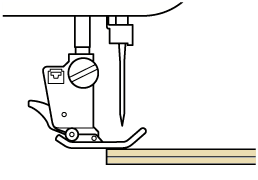
- The presser foot remains level, enabling the fabric to be fed.
- Once the trouble spot has been passed, the foot will return to its normal position.
- When [Automatic Fabric Sensor System] (Automatic Presser Foot Pressure) in the machine settings screen is set to [ON], the thickness of the fabric is automatically detected by the internal sensor so the fabric can be fed smoothly for best sewing results.
Automatic Fabric Sensor System (Automatic Presser Foot Pressure)
Sewing Lightweight Fabrics
Place thin paper or tear away embroidery stabilizer under thin fabrics to make sewing easier. Gently tear off the paper or the stabilizer after sewing.
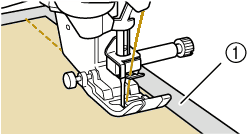
- Thin paper
Sewing Stretch Fabrics
First, baste together the pieces of fabric, and then sew without stretching the fabric.
In addition, a better result can be achieved by using thread for knits or a stretch stitch.
For best results when sewing stretch fabrics, decrease the pressure of the presser foot.
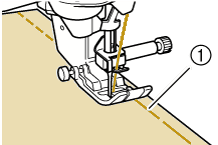
- Basting stitch
Sewing Leathers or Vinyl Fabrics
When sewing fabrics that may stick to the presser foot, such as leather or vinyl fabrics, replace the presser foot with the compact digital dual feed foot.
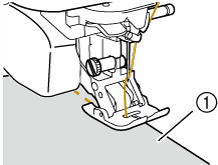
- Leather
If the leather or vinyl fabric sticks to the flat bed attachment, sew with copy paper or tracing paper placed on top of the flat bed attachment so the fabric moves smoothly.
If the paper is positioned so that it does not cover the needle plate, the paper will not be sewn together with the fabric.
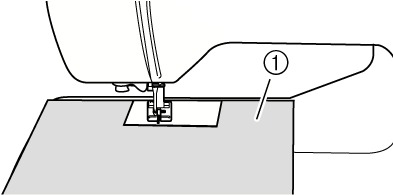
- Copy paper or tracing paper