
Attaching the Presser Foot with the Included Adapter
Some presser feet require using the included adapter and small screw, for example, the walking foot and so on.
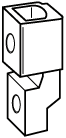 |  |
Attaching the Walking Foot (Sold Separately)
The walking foot holds the fabric between the presser foot and the feed dogs to feed the fabric. This enables you to have better fabric control when sewing difficult fabrics (such as quilted fabrics or velvet) or fabrics that slip easily (such as vinyl, leather, or synthetic leather).
- Thread the needle manually when using the walking foot, or only attach the walking foot after threading the needle using the needle threader lever.
- When sewing with the walking foot, sew at medium to low speeds.
The walking foot can only be used with straight or zigzag stitch patterns. Reverse stitches cannot be sewn with the walking foot. Only select straight or zigzag stitch patterns with reinforcement stitches.
Remove the presser foot.
Loosen the screw of the presser foot holder to remove the presser foot holder.
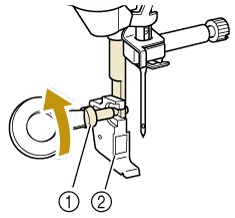
- Presser foot holder screw
- Presser foot holder
Remove the screw of the presser foot completely from the presser foot shaft.
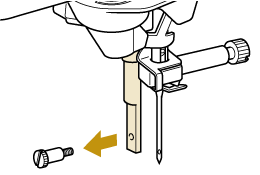
Set the adapter on the presser foot bar, aligning the flat side of the adapter opening with the flat side of the presser bar. Align the screw holes in the adapter and presser foot bar, and then securely tighten the screw with the disc-shaped screwdriver.
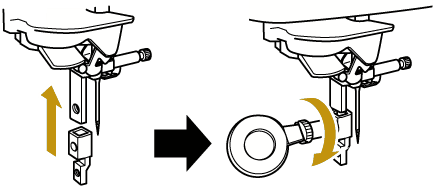
Turn the included small screw 2 or 3 times with your hand.
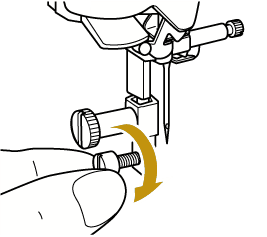
Set the operation lever of the walking foot so that the needle clamp screw is set in the fork. Position the shank of the walking foot on the presser foot bar.
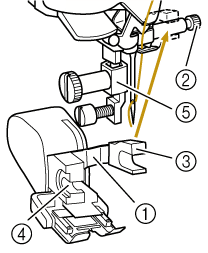
- Operation lever
- Needle clamp screw
- Fork
- Walking foot shank
- Presser foot bar
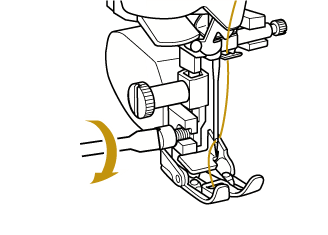
Lower the presser foot lever. Insert the screw, and tighten the screw securely with the screwdriver.
 CAUTION
- Use the included screwdriver to tighten the screw securely. If the screw is loose, the needle may strike the presser foot and cause injury.
- Be sure to rotate the handwheel toward you (counterclockwise) to check that the needle does not strike the presser foot. If the needle strikes the presser foot, injury may result.
Touch
 to unlock all keys and buttons.