
Twin Needle
With the twin needle, you can sew two parallel lines of the same stitch with two different threads. Both upper threads should have the same thickness and quality.
 CAUTION
- When using the twin needle, it is recommended to use presser foot “J”. Otherwise, the needle may break and cause injury.
- Before changing the needle or threading the machine, be sure to touch
 on the LCD screen to lock all keys and buttons. Otherwise, injuries may occur if the “Start/Stop” button or any other button is pressed and the machine starts sewing.
Only use the twin needle (2/11 needle), and never use the needle threader with the twin needle.
Otherwise, the needle may break or the machine may be damaged.
Touch
and install the twin needle.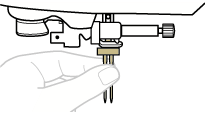
For details on installing a needle, refer to “Changing the Needle”.
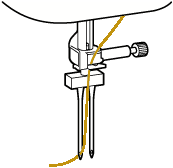
Pass the first upper thread behind the needle bar thread guide.
Manually thread the left needle with the first upper thread.
Pass the thread through the eye of the needle from the front.
Insert the horizontal spool pin onto the bobbin winder shaft.
Insert the spool pin so that it is perpendicular to the bobbin winder shaft.
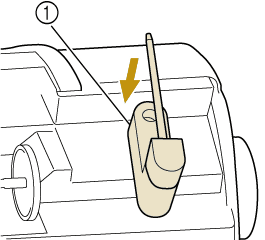
- Bobbin winder shaft
Swing the spool pin toward the left so that it is horizontal.
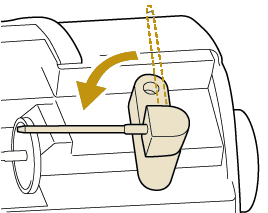
Place the upper thread spool for the needle on the right side onto the spool pin, and then secure it with the spool cap.
The thread should unwind from the front at the bottom of the spool.
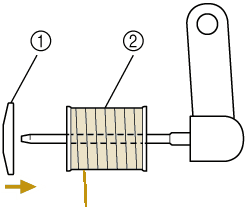
- Spool cap
- Spool
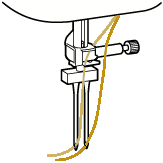
Thread the upper thread in the same way that the upper thread for the left side was threaded.
Without passing the thread through the needle bar thread guide, manually thread the right needle.
Insert the thread through the eye of the needle from the front to the back.
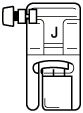
Attach zigzag foot “J”.
For details on changing the presser foot, refer to “Replacing the presser foot”.
 CAUTION
When using the twin needle, be sure to attach zigzag foot “J”. If bunched stitches occur, use monogramming foot “N” or attach stabilizer material.
Touch
 to unlock all keys and buttons.
Display the stitch selection screen and touch
 .
.- The machine switches to twin needle mode.
CAUTIONBe sure to set the twin needle mode when using the twin needle. Using the twin needle while the machine is in single needle mode could cause the needle to break and cause injury.
Select a stitch.
For stitches that use a twin needle, refer to the following link.
Start sewing.

To change direction when sewing with the twin needle, raise the needle from the fabric, raise the presser foot lever, and then turn the fabric.