
Viewing the Embroidery Screen
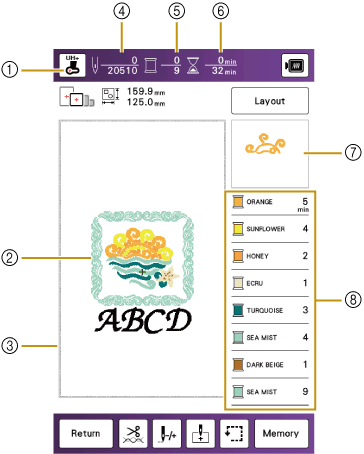
This screen appears when embroidery starts.
- Presser foot (Needle point check key)
Shows presser foot to be used.
If the embroidery foot “UH +” with LED pointer is used, the needle drop point can be checked with the light of the LED by touching the key.Checking the Needle Drop Point with the Embroidery Foot “UH+” with LED Pointer
- A preview of the pattern
- The boundary for embroidering with the frame selected in the settings screen
- Total number of stitches in the selected pattern and number of stitches that have already been embroidered
- The number of colors in the pattern, and the number of the color currently being embroidered
- The time necessary to embroider the pattern, and the time already spent embroidering the pattern (not including time for changing and automatically trimming the thread)
- The part of the embroidery pattern that will be embroidered with the thread color at the top of the list
- The order for thread color changes and the embroidering time for each thread color
The displayed time is the approximate time that will be required. The actual embroidering time may be longer than the displayed time, depending on the embroidery frame that is used. In addition, the amount of time required to change thread colors is not included.