Method 2: Sewing a Specified Number of Stitch Patterns
With this method, the number of stitch patterns (including those used to change the angle) are specified. This allows stitch patterns of the same length to be repeatedly sewn.
Refer to steps 1 through 4 of “Method 1: Begin Changing the Angle at the End of Sewing by Pressing the “Reverse Stitch” Button” to select the angle settings for the start and end of sewing.
Method 1: Begin Changing the Angle at the End of Sewing by Pressing the “Reverse Stitch” Button
Touch
 , and then specify the number of stitch patterns (including those used to change the angle).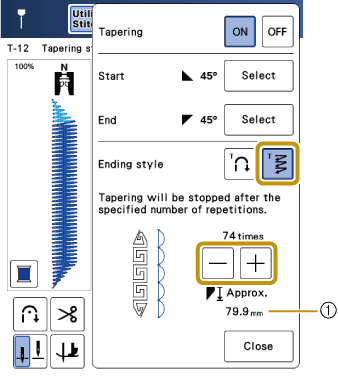
- Approximate length of the stitch pattern
The length of the stitches may differ depending on the selected stitch pattern and the angle. Specify the number of repetitions for each stitch pattern and perform trial sewing to check the result.
Start sewing.
- The machine stops automatically when sewing is finished.
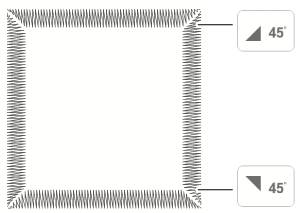
To sew stitching in a square, select
 for the start of sewing and
  for the end of sewing, and then continue sewing the same stitch pattern, rotating the fabric 90° after sewing each line of stitching.
The pivot setting is useful when changing the sewing direction.