Adjusting Thread Tension
Adjust thread tension according to the situation.
Correct Thread Tension
Upper thread slightly appears on the wrong side of fabric.

- Right side
- Wrong side
Upper Thread Is Too Tight
Bobbin thread appears slightly on the right side of fabric. In this case, loosen the upper thread tension.

- Right side
- Wrong side
If the bobbin thread was incorrectly threaded, the upper thread may appear to be too tight. In this case, rethread the bobbin thread.
Upper Thread Is Too Loose
Loops appear on the right side of the fabric. In this case, tighten the upper thread tension.
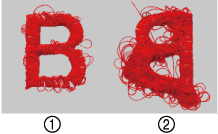
- Right side
- Wrong side
If the upper thread was incorrectly threaded, the upper thread may appear to be too loose. In this case, carefully rethread the upper thread and test-embroider again.
If necessary, tighten the upper thread tension.
Adjusting the Tension of the Upper Thread
On the embroidery screen, touch
 .
.
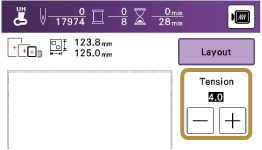
Adjust the upper thread tension.
- Touch
 to loosen the upper thread tension. (The tension number will decrease.)
 - Touch
 to tighten the upper thread tension. (The tension number will increase.)
If the thread tension setting is made extremely loose, the machine may stop during embroidering. In this case, reset the bobbin (ensuring it has passed under the tension spring) and test-embroider again. If necessary, slightly increase the upper thread tension.
- Touch
Adjusting Overall Upper Thread Tension
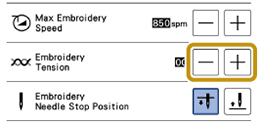
When embroidering, if the overall tension of the upper thread is too tight or too loose, adjust it from the setting screen. If an individual embroidery pattern needs additional fine tuning, refer to the following.
Adjusting the Tension of the Upper Thread
Touch
 .
.In the [Embroidery Tension], adjust the upper thread tension.
Increase to tighten the upper thread tension.
Decrease to loosen the upper thread tension.